Live store intelligence for Shopify

Your online store, alive as a shop floor

Watch shoppers walk in, browse and fill their carts, live. When one hesitates at the cart, Floq offers the right help, or stays quiet. Every sale after it is matched to the real Shopify order.

Free plan One app embed, no code Nothing collected before consent

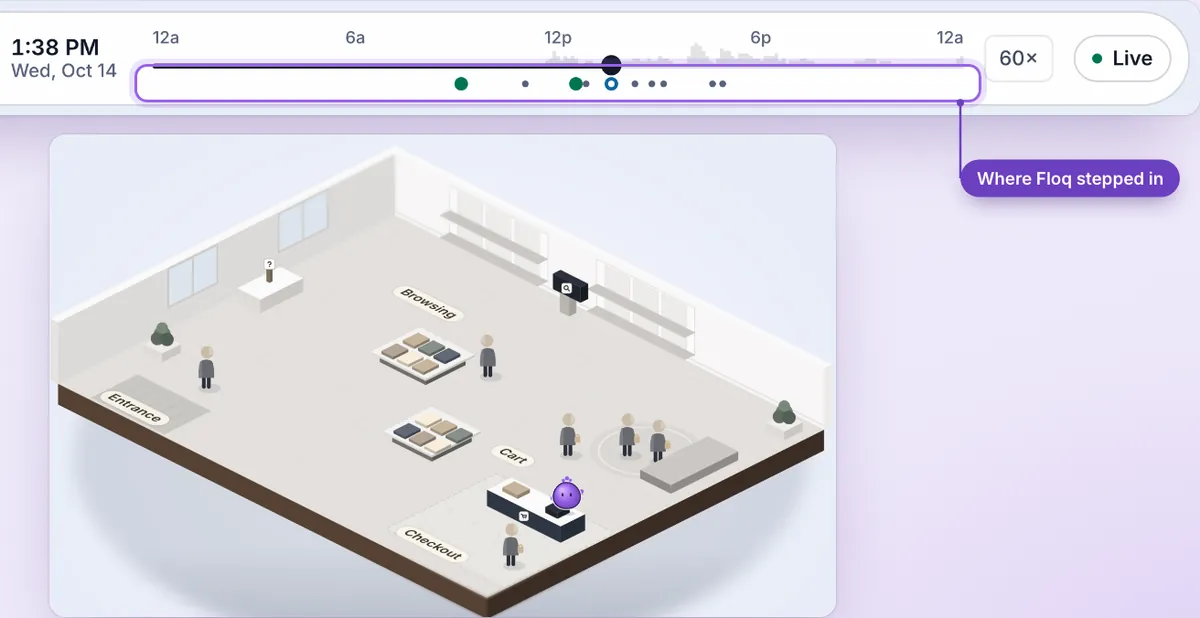
Fernvale Supply, a fictional store, as a live shop floor: shoppers walk in, browse tables, fill carts and check out. One shopper stops at the cart, Floq's help card appears, and they go on to buy.
Why it matters

In a real store, someone notices. Online, nobody does.

About 7 in 10 online carts never reach an order.1 The top reasons are surprise costs, slow delivery and doubts about the store,2 and a store can answer each of those on the page. Follow-up email only starts once a shopper has typed an email.3

~70%of online carts are left without an orderBaymard, 2025
40%of those who left said extra costs were too highBaymard
20%said delivery was too slowBaymard

Floq helps while they're still deciding. Keep your email flows for whoever leaves; they work.4

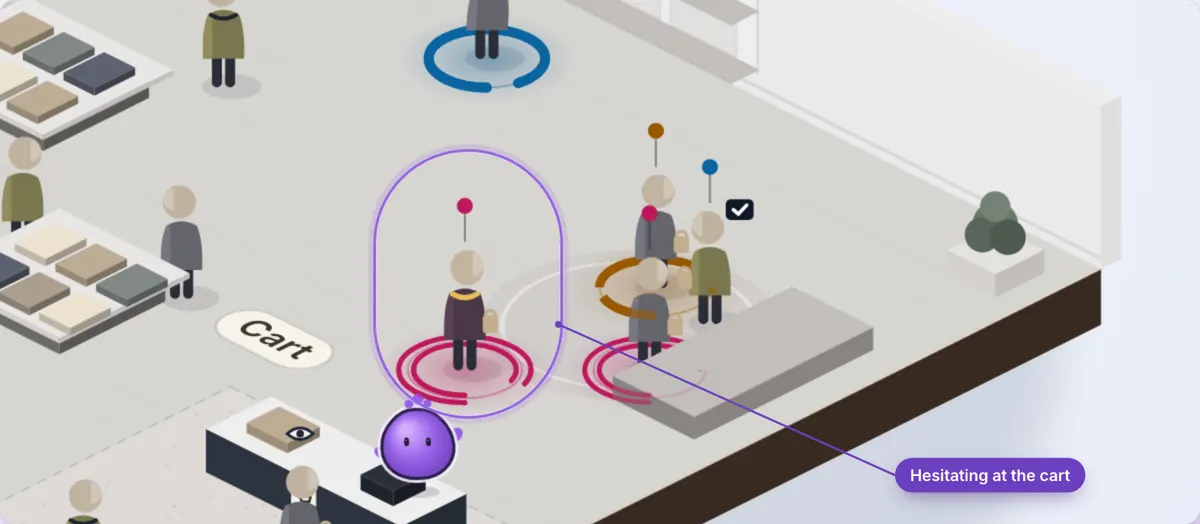
Close-up of the live floor: one shopper at the cart is circled and labelled Hesitating at the cart, while other shoppers keep moving
  1. 1. Baymard Institute, cart abandonment rate: average of 50 studies, updated September 2025.
  2. 2. Baymard Institute, reasons for abandonment, excluding "just browsing".
  3. 3. Shopify Help Center, abandoned checkouts.
  4. 4. Klaviyo, abandoned cart benchmarks, 2026.
How it works

Like a great floor associate, for your online store

Floq watches the floor, notices who's stuck, and helps at the right moment. Or it stays quiet.

  1. 1 · WATCH

    Shoppers walk your floor, live

    Shoppers appear on your floor as they walk in, browse, fill carts and check out. Nothing is collected before a shopper agrees.

  2. 2 · NOTICE

    Floq spots who's hesitating

    A shopper checks the shipping policy twice, or stalls at the cart. Floq notices, and works out whether help would actually help.

  3. 3 · HELP

    The right help, or none

    An answer from your own policies, a real stock note, or an offer only if you allow it. Step in with a tap, or let Floq stay quiet.

What you get

See it, help, and know what worked

See it live

Your whole store at a glance

Shoppers become figures walking from the door to the shelves, the cart and checkout. Spot who's hesitating as it happens, then replay the day to see where Floq stepped in.

  • Live floor, a list of shoppers and Replay
  • Bots are left off your floor
Replay of a day at Fernvale Supply, a fictional store: a timeline with markers where Floq stepped in, above the isometric store floor
Help before offers

Help that feels like your store

The right help at each moment: an answer while they browse, your own shipping and returns policies while they think it over, a real stock note, and an offer only if you allow offers. Or it leaves the shopper be.

  • One small card at a time, in your store's style
  • Shoppers can close it any time
  • Discounts stay off until you allow them
  1. BrowsingHelp card: Questions about this item? Ask us about sizing, care or delivery. Ask a question.
  2. Thinking it overReassurance card quoting the store's shipping and returns policies, with links to both.
  3. Low stockStock note: Only 2 left in Sand.
  4. In cartOffer card, only when the store allows offers: Free shipping is on us for this order. The code applies at checkout.
Plain-words reasons

Every suggestion explains itself

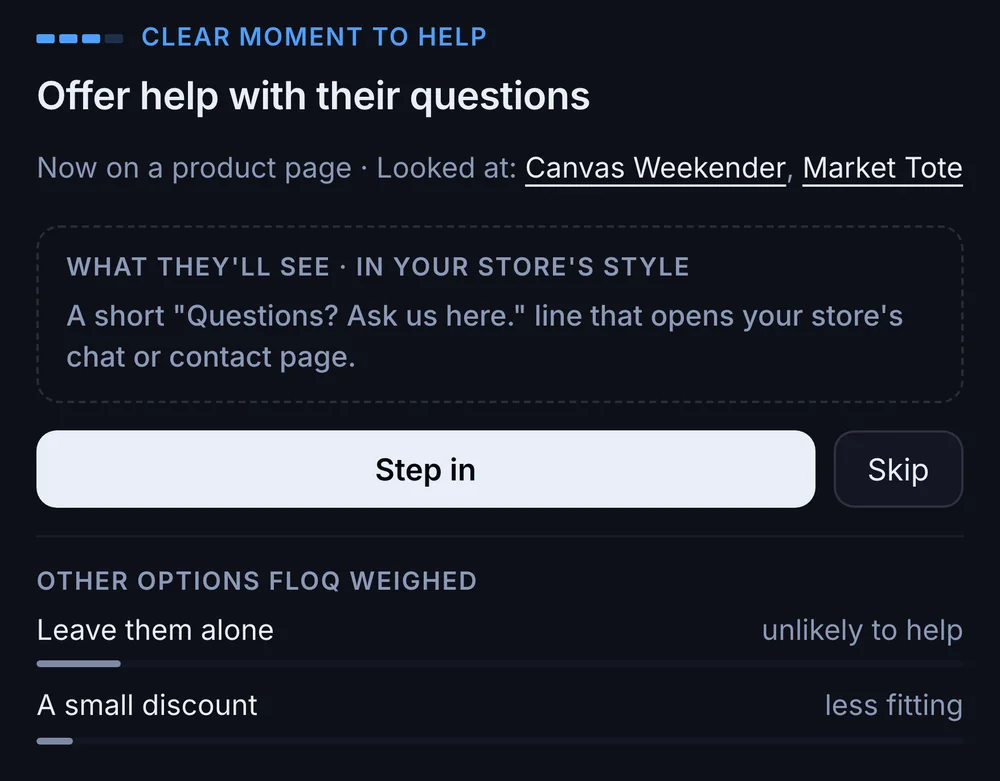
See what Floq noticed about the shopper and the options it passed on, in plain words. Only real Shopify orders teach it what works in your store.

  • Step in, or skip it
  • Learns from real results, not clicks
Floq's suggestion card: Clear moment to help. Offer help with their questions. Now on a product page, looked at Canvas Weekender and Market Tote. Other options weighed: leave them alone, unlikely to help; a small discount, less fitting
Checked with Shopify

Only real orders count

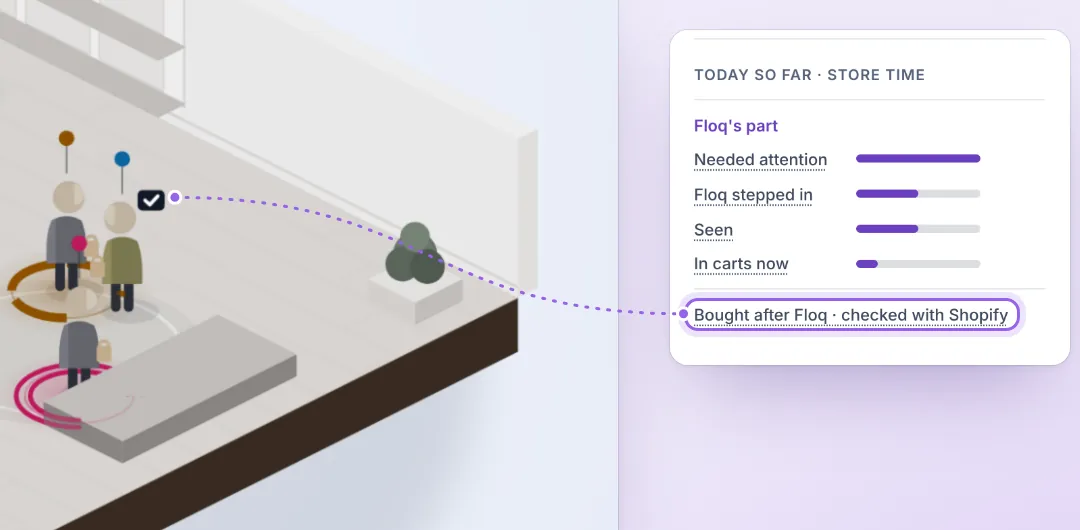
Floq doesn't grade its own homework. A sale counts only when Shopify's own order says so, matched to the moment Floq stepped in. Nothing self-reported.

Bought after Floq · checked with Shopify
A shopper at checkout on the live floor, linked to a summary panel whose highlighted line reads Bought after Floq, checked with Shopify

The real order, not a guess

Money comes only from Shopify's own order. A checkout event seen on the page is never shown as a sale.

Matched to the moment

An order is credited only when it lands within two hours of Floq stepping in, matched by the shopper or the code Floq made for them.

Counted once

Each order counts once, however many times Shopify sends it.

Honest about cause

"Bought after Floq" means exactly that. Floq says it added sales only when shoppers it left alone show a clear difference.

Consent firstNothing is collected before a shopper agrees.

No personal detailsFloq never receives names, emails, phone numbers or addresses.

Light on your pagesTwo small files, loaded after your page.

No codeOne app embed, for any theme.

Floq is an independent app. It isn't made or endorsed by Shopify.

Pricing

Start free. Grow when your store does.

Billed through Shopify, in US dollars. Bots never count toward your visitors.

Free

$0forever

For getting to know your floor.

  • 10,000 store visitors a month
  • Live floor, list of shoppers and Replay
  • Every kind of help, and Step in on any shopper
  • Acts on its own up to 10 times a month, for help you've agreed with
  • Replay and shopper history for 7 days
  • Every sale after Floq matched to the Shopify order
Join the beta

Pro

7-day free trial
$19/mo

For stores with steady traffic.

  • 50,000 store visitors a month
  • Everything in Free
  • Acts on its own for all help you've agreed with, no separate limit
  • Replay and shopper history for 90 days
  • Your plan never changes on its own
Join the beta

Busy month on Pro? Extra store visitors are $4 per 10,000 visitors, up to $80/mo, and never past the monthly limit you approve in Shopify.

More than 250,000 a month? Contact us

Billed every 30 days through Shopify.

FAQ

Questions merchants ask first

How do I set it up?

Install Floq, then turn on its app embed in your theme editor. No code, and it works with any theme. Your floor fills in as shoppers arrive.

Will it slow my store down?

Floq loads after your page does. The help card only loads when there's something useful to show.

What do my shoppers see?

Usually nothing. When a shopper hesitates at the cart, they may see one small card in your store's style, such as an answer from your shipping policy. They can close it any time.

What does Floq track?

Nothing before a shopper consents. After that, it sees how they move through your store. Floq never receives names, emails, phone numbers or addresses.

Do discounts go out automatically?

No. Floq starts with help and answers. Offers stay off until you allow them, and you set the limit.

Read the full FAQ

Get Floq

Give your store someone on the floor

Four steps, no code. Then watch your store come alive.

  1. 1
    Install from the Shopify App Store

    Open Floq on the Shopify App Store and click Install.

  2. 2
    Approve the permissions

    Shopify shows what Floq can access. Approve it in your Shopify admin.

  3. 3
    Turn on the Floq app embed

    One click from Floq's setup card turns it on in your theme. No code.

  4. 4
    Walk in

    Open your store, and watch yourself walk in on the floor.